Written by Kelsey Beauchamp, CEO of Information Management Systems (IMS)
If the roof is leaking and the kitchen is showing its age, both may need attention.
But only one is likely to ruin your week.
Technology budgeting can put business owners in the same position.
A few computers are getting older.
A software renewal is coming up.
Your cybersecurity could use an improvement.
Employees are frustrated with a system they use every day.
Someone wants a new application.
And there is a major technology project leadership has been discussing for months.
Every item may have a legitimate reason behind it.
That does not mean every one of them needs to be funded right now.
For Small/Medium Businesses (SMB's) throughout North Dakota, South Dakota, and Minnesota, the real challenge of IT budgeting is not simply figuring out how much to spend.
It is deciding:
What needs attention now?
What should we prepare for next?
What can reasonably wait?
A good IT budget should help answer those questions before every technology decision starts feeling like an emergency.
Quick Answer: How Should a Small Business Prioritize Its IT Budget?
A Small/Medium Business should prioritize its IT budget based on business risk, employee productivity, cybersecurity, known future expenses, and upcoming business changes.
Start by asking:
- What happens if we wait?
- What costs do we already know are coming?
- What is changing in the business?
The highest priorities are generally the technology issues that could create significant downtime, security risk, lost productivity, unexpected expense, or prevent the business from accomplishing an important goal.
The objective is not to fund everything at once.
It is to spend money in the right order.
IT Budgeting Should Start With the Business, Not the Technology
One of the easiest mistakes businesses make is building an IT budget around a list of equipment and software.
Five computers.
Microsoft 365 licenses.
A firewall.
Backup.
Cybersecurity tools.
A new switch.
A server.
Those things may all be necessary.
But a useful technology budget starts somewhere else.
It starts with the business.
What are you trying to accomplish next year?
Are you hiring?
Are you opening another location?
Are employees losing time because of aging equipment?
Are you changing software?
Are there cybersecurity risks that need to be addressed?
Are you trying to improve efficiency?
Is important equipment approaching end of life?
When technology spending is connected to business priorities, it becomes much easier to determine what deserves funding.
1. What Happens If We Wait?
This is one of the most useful questions you can ask when evaluating an IT expense.
Not:
"Do we want this?"
Instead ask:
"What happens to the business if we wait another three, six, or twelve months?"
The answer can help separate something that would be nice to improve from something that could become a real business problem.
Consider an aging laptop
A computer may be several years old and a little slower than it used to be.
But if it is still reliable, supported, secure, and not significantly affecting productivity, replacing it this quarter may not be necessary.
Now compare that with a computer that:
- Frequently crashes
- Cannot support current software
- Is no longer receiving appropriate updates
- Causes an employee to lose productive time every day
That changes the calculation.
Consider cybersecurity
The same principle applies to security.
An improvement that addresses a meaningful vulnerability may deserve priority even though employees cannot physically see the benefit.
You are not simply purchasing another technology tool.
You are reducing business risk.
Consider recurring downtime
If an important system goes down several times each month, the cost of waiting may be higher than the price of fixing the underlying issue.
That cost can show up as:
- Lost employee productivity
- Delayed customer service
- Missed deadlines
- Leadership frustration
- Overtime
- Lost opportunities
- Emergency repair costs
The priority of an IT expense should reflect the business impact of waiting, not simply how long the item has been sitting on someone's wish list.
A Simple Way to Prioritize IT Spending
When evaluating an expense, ask four questions:
- Could waiting create a cybersecurity risk?
- Could waiting cause meaningful downtime?
- Is the issue regularly affecting employee productivity?
- Could waiting make the eventual solution more expensive?
If the answer to several of those questions is yes, the item probably deserves more attention.
2. What Technology Expenses Do We Already Know Are Coming?
Not every technology expense is a surprise.
In fact, many are highly predictable.
That is good news for your budget.
You may already know about:
- Microsoft 365 licensing
- Software renewals
- Cybersecurity subscriptions
- Internet services
- Phone systems
- Equipment warranties
- Backup services
- Firewall renewals
- Hardware replacements
- New employee technology
- Vendor contracts
These costs should not suddenly appear as unexpected expenses.
Think about employee growth
Suppose your business has 30 employees today and expects to hire five more next year.
Those employees may need:
- Computers
- Monitors
- Microsoft 365 licenses
- Phone service
- Cybersecurity tools
- Business application licenses
- Accessories
- IT setup and onboarding
You may not be paying for those costs today.
But if the hiring plan already exists, the technology expense is not truly unexpected.
It belongs in the budget.
Equipment Replacement Should Be Planned Too
Technology has a lifecycle.
Computers do not last forever.
Neither do servers, network equipment, firewalls, or other hardware.
Businesses should know what equipment they own, approximately how old it is, and when replacement is likely to make sense.
That does not mean replacing every computer the moment it reaches a certain birthday.
It means having visibility.
Instead of discovering that seven computers need to be replaced in the same month, you may be able to plan replacements across several quarters.
That turns an unexpected expense into a manageable one.
IT Budgeting Should Reduce Surprises
A good technology budget will not eliminate every surprise.
Equipment can still fail.
Business needs can change.
New cybersecurity risks can emerge.
But predictable expenses should be planned whenever possible.
Your managed IT provider should help you identify those costs before the invoice arrives.
3. What Is Changing in the Business?
Your IT budget should not simply reflect the business you have today.
It should also reflect the business you are building.
Imagine your company plans to open a second location.
That decision creates technology questions almost immediately.
You may need to think about:
- Internet connectivity
- Wi-Fi
- Network equipment
- Computers
- Phones
- Cybersecurity
- Physical security
- Access control
- Printers
- Shared applications
- Remote access
- Backup
- Ongoing IT support
If those conversations begin one week before opening, your options may be limited.
You may also pay more because everything suddenly becomes urgent.
Planning earlier gives you time to compare solutions, budget properly, coordinate vendors, and avoid opening-day surprises.
Hiring Changes Your IT Budget Too
Growth often creates technology costs gradually.
One new employee may not significantly change the budget.
Ten new employees might.
As your team grows, you may need more than additional laptops and licenses.
You may also need to revisit:
- Network capacity
- Cybersecurity
- Software licensing tiers
- File storage
- Phone systems
- Backup capacity
- Help desk support
- Onboarding processes
- Access management
Growth affects technology in ways that are not always obvious at first.
Remote and Hybrid Work Can Change the Plan
If employees begin working from home more often, the technology environment may need to change.
You may need better remote access.
Different security controls.
Additional cloud services.
More laptops.
Improved collaboration tools.
Changes to phone systems.
What looks like a staffing decision can quickly become an IT budgeting decision too.
New Software Can Have Hidden Costs
Businesses often evaluate new software based on the subscription price.
But the true cost may also include:
- Implementation
- Training
- Data migration
- Integration
- Security
- Additional licenses
- Consulting
- Ongoing support
Before putting a new platform into the IT budget, understand the full cost of adopting it.
A $500 monthly subscription may involve considerably more than $6,000 in first-year costs.
Not Every IT Project Needs to Happen This Year
This is an important part of budgeting that sometimes gets overlooked.
Your IT provider should be able to tell you when something can wait.
Every recommendation should not automatically be treated as urgent.
There may be projects worth doing eventually that do not create significant risk if they are postponed.
Those items can be placed into a longer-term technology roadmap.
For example:
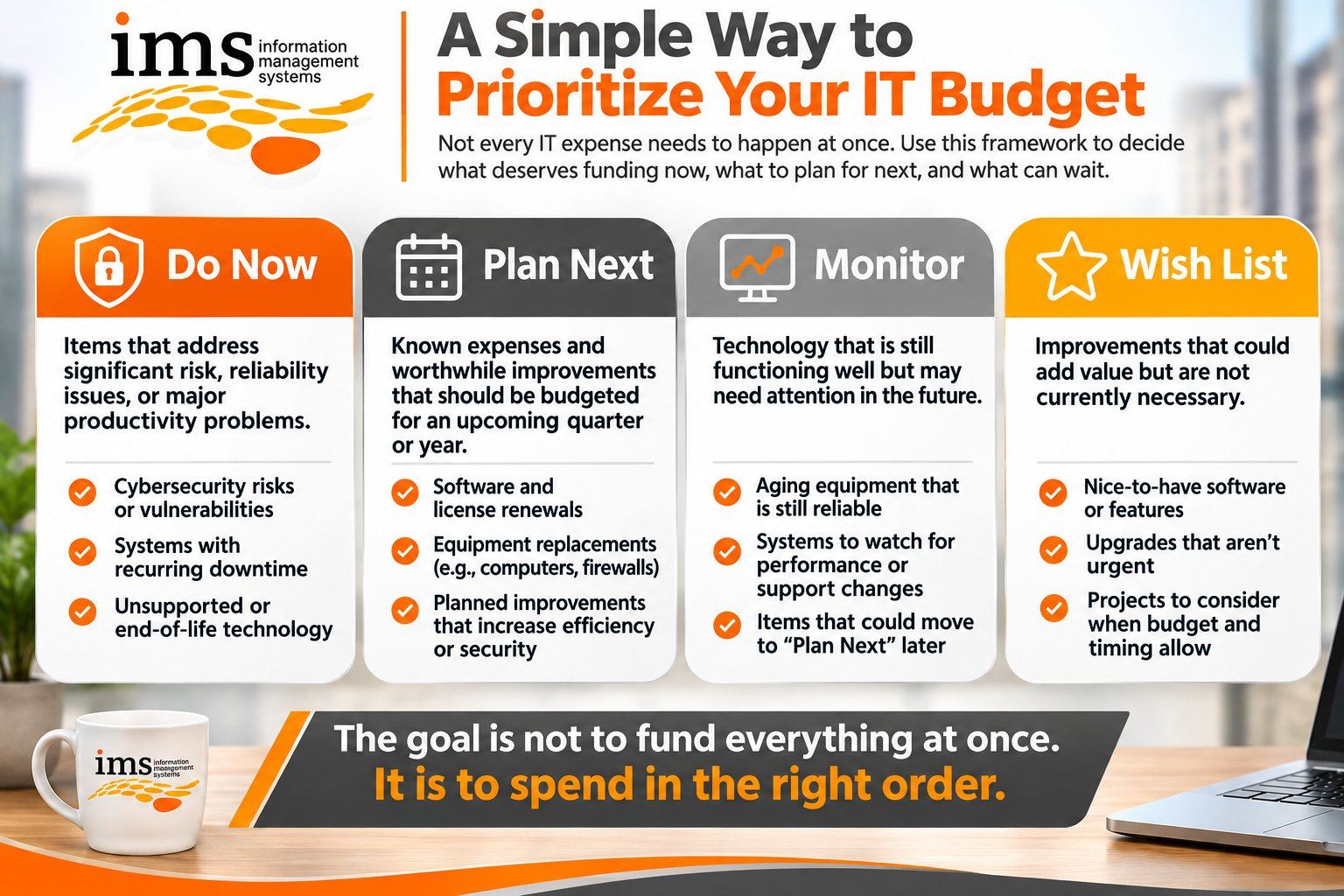
Do now
Items that address significant cybersecurity risk, reliability issues, unsupported technology, or major productivity problems.
Plan next
Known expenses and worthwhile improvements that should be budgeted for an upcoming quarter or year.
Monitor
Equipment or systems that are still functioning appropriately but may need attention in the future.
Wish list
Improvements that could create value but are not currently necessary.
This gives leadership a much clearer picture than one giant list labeled:
IT Needs
Cybersecurity Should Have Its Own Place in the IT Budget
Cybersecurity is sometimes treated as an optional technology expense.
That is becoming increasingly difficult to justify.
Cybersecurity can affect:
- Business continuity
- Customer trust
- Financial information
- Employee information
- Insurance
- Compliance
- Reputation
- Productivity
That does not mean buying every security product available.
It means intentionally budgeting for the protections that match your business's risks.
Depending on the organization, those may include:
- Multifactor authentication
- Email security
- Endpoint protection
- Managed firewalls
- Security awareness training
- Password management
- Backup and recovery
- Security monitoring
- Patch management
Your cybersecurity budget should be based on risk, not fear.
Your IT provider should be able to explain what you are paying for, what risk it addresses, and why it is recommended.
Employee Productivity Belongs in the IT Budget Conversation
Technology spending is not only about infrastructure.
It is also about your employees.
Consider an employee who earns $60,000 a year and loses 15 or 20 minutes every day because their computer is painfully slow.
The cost of the problem is not simply an annoying computer.
The business is paying for that lost time.
Multiply that across several employees and recurring technology frustrations can become expensive.
When deciding whether something belongs in the IT budget, ask:
Is this technology helping our employees do their jobs efficiently?
If the answer is consistently no, the issue may deserve attention.
Your IT Provider Should Help Build the Budget
Small/Medium Businesses should not have to build a technology budget alone.
Your managed IT provider should be able to help leadership understand:
- Current technology costs
- Upcoming renewals
- Equipment approaching replacement
- Cybersecurity priorities
- Known projects
- Business growth requirements
- Potential risks
- Opportunities to improve productivity
Ideally, those conversations happen before the annual budget is finalized.
That allows technology investments to be evaluated alongside the rest of the business.
What Should an Annual IT Budget Include?
For many SMBs, an annual IT budget may include:
Recurring technology expenses
Software subscriptions, Microsoft 365, cybersecurity services, managed IT services, internet, phones, cloud services, and backup.
Equipment replacement
Computers, monitors, servers, firewalls, network equipment, phones, and other hardware.
Cybersecurity
Security software, employee awareness training, monitoring, backups, and planned improvements.
Business projects
Office moves, new locations, cloud migrations, software implementations, and other major initiatives.
Growth
Technology for new employees, departments, locations, or service lines.
Contingency
Some flexibility for unexpected equipment failures or technology needs.
The exact numbers will vary significantly from one organization to another.
The important part is knowing what categories need to be considered.
Why IT Budget Planning Matters for SMBs in ND, SD, and MN
Small and medium-sized businesses throughout North Dakota, South Dakota, and Minnesota often run lean.
There may not be a separate IT director, cybersecurity officer, procurement department, and finance team all evaluating technology decisions.
The owner, CEO, CFO, office manager, or operations leader may be wearing several of those hats.
That makes planning especially important.
You should not need to become an IT expert to create a reasonable technology budget.
You need someone who can help translate technology decisions into business decisions.
Not:
"You need a new firewall."
But:
"This firewall will need to be replaced next year, so let's include it in the budget now rather than make it an unexpected expense later."
That is a much more useful conversation.
Know What Needs to Come First
Go back to the house.
The kitchen may be outdated.
You might really want to remodel it.
But if the roof is leaking, you probably know where the money needs to go first.
Your IT budget works the same way.
Some expenses reduce meaningful business risk.
Some prevent downtime.
Some prepare you for growth.
Some improve employee productivity.
Some are predictable costs that should already be on the calendar.
And some can wait another quarter without creating a problem.
Good IT budgeting is not about saying yes to everything.
It is about knowing what deserves a yes now.
Your Technology Budget Should Give You Clarity
At Information Management Systems, we help Small/Medium Businesses (SMB's) throughout North Dakota, South Dakota, and Minnesota understand what their technology environment needs today and what they should prepare for next.
That includes helping leadership identify:
What needs attention now.
What should be budgeted next.
What costs are already coming.
What can reasonably wait.
The goal is to create fewer surprises and better business decisions.
Because you should not have to treat every technology expense like an emergency.
If your IT wish list keeps getting longer and you are not sure where to start, we would be happy to help you sort through it.
Schedule a discovery call with Information Management Systems.
Call 701-364-2718 or visit www.imsnetworking.com.
Frequently Asked Questions About IT Budgeting for Small and Medium Businesses
1. How should a small business prioritize its IT budget?
A Small/Medium Business should prioritize IT spending based on business impact. Technology investments that reduce cybersecurity risk, prevent significant downtime, improve employee productivity, replace unsupported technology, or support important business goals should generally receive greater priority. Lower-risk improvements can often be planned for a future quarter or budget year.
2. What should be included in a small business IT budget?
A small business IT budget should typically include managed IT services, software licensing, Microsoft 365, cybersecurity, backup and recovery, internet and phone services, hardware replacement, technology projects, new employee equipment, and a contingency for unexpected needs. The exact budget will depend on the organization's size, industry, technology environment, and growth plans.
3. How often should an SMB review its IT budget?
Small and medium-sized businesses should review their IT budget at least annually and revisit it throughout the year as business priorities change. Quarterly technology reviews can help leadership monitor upcoming renewals, equipment replacements, cybersecurity needs, hiring plans, and projects before they become urgent expenses.
4. How much should a small business budget for cybersecurity?
There is no single cybersecurity budget that is appropriate for every small business. The right investment depends on factors such as company size, industry, sensitive data, regulatory requirements, cyber insurance requirements, technology environment, and business risk. An IT provider should help leadership determine which protections are appropriate and explain the business risk each recommendation addresses.
5. How can businesses in North Dakota, South Dakota, and Minnesota plan for future IT costs?
SMBs in North Dakota, South Dakota, and Minnesota can plan future IT costs by maintaining an equipment lifecycle, tracking software renewals, forecasting hiring and growth, reviewing cybersecurity needs, and creating a technology roadmap with their managed IT provider. Planning these expenses in advance can reduce surprise costs and help businesses spread larger investments across multiple quarters or budget years.