Written by Kelsey Beauchamp
Halloween has plenty of monsters.
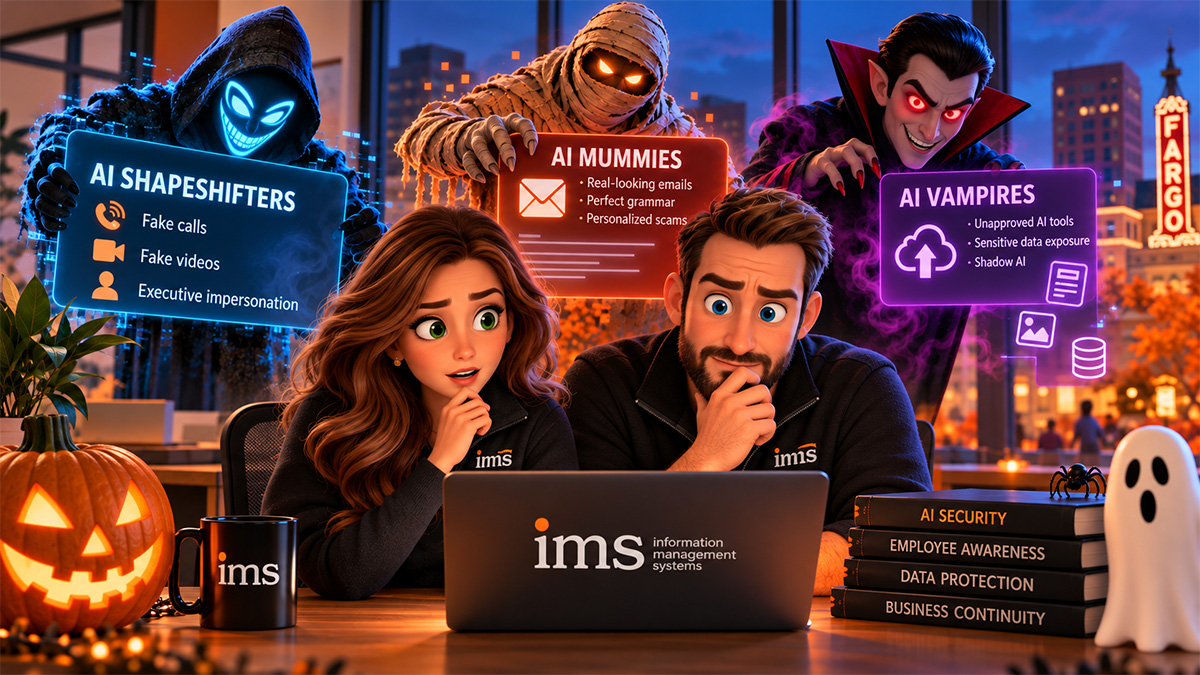
Vampires. Ghosts. Mummies. Shapeshifters.
Fortunately, most of them disappear when the costumes come off.
The threats facing businesses are a little different.
Today's cybercriminals do not announce themselves with flashing warning signs. They are getting better at disguising themselves as people and organizations your employees already trust.
An email can sound like your CEO.
A voicemail can sound like a coworker.
A message can look like it came from a longtime vendor.
And an AI tool that seems helpful can create an entirely different type of risk when employees give it information that should never leave your organization.
For Small/Medium Businesses (SMB's) throughout North Dakota, South Dakota, and Minnesota, artificial intelligence brings tremendous opportunity.
It can help employees work faster, summarize information, generate ideas, automate tasks, and improve productivity.
But AI is also changing the cybersecurity landscape.
The answer is not to be afraid of AI.
The answer is to make sure your business has the right rules, processes, technology, and employee awareness in place to use it safely.
Quick Answer: What Cybersecurity Risks Does AI Create for Small Businesses?
AI can increase cybersecurity risk by making phishing emails, impersonation attempts, fraudulent requests, fake audio, and other social engineering attacks more convincing.
Businesses can also create their own risk when employees enter confidential information into unapproved AI applications.
Small and medium-sized businesses should respond by strengthening:
- Verification procedures
- Multifactor authentication
- Employee cybersecurity awareness
- AI usage policies
- Access controls
- Email security
- Incident reporting procedures
- Vendor verification
- Data protection
- Managed cybersecurity monitoring
The goal is not to teach every employee how to identify AI.
The goal is to create processes that remain secure even when a fake looks real.
AI Is Making Old Cybersecurity Threats More Convincing
One misconception about AI and cybersecurity is that every threat is brand new.
Many are not.
Phishing is not new.
Fraudulent payment requests are not new.
Impersonating executives is not new.
Stealing passwords is not new.
Social engineering is definitely not new.
What AI changes is the quality, speed, and personalization of those attacks.
The poorly written phishing email filled with obvious spelling mistakes is no longer the only thing employees need to watch for.
A malicious email can be polished.
Professional.
Personalized.
And completely believable.
For businesses that have traditionally taught employees to "look for bad grammar," that creates a problem.
The costume has gotten better.
So the way we evaluate the threat needs to change too.
AI Shapeshifters: When Seeing and Hearing Is No Longer Believing
Imagine someone in accounting receives a voicemail from the company owner.
The voice sounds right.
The person uses familiar phrases.
There is urgency in the request.
They need a payment processed immediately.
Would your employee do it?
That is where processes become more important than perception.
AI-generated audio, video, and messages can make impersonation attempts more convincing. Employees should not be expected to determine with certainty whether every piece of digital content was created by AI.
Instead, build verification into the business.
If an unusual request involves money, credentials, sensitive information, or account access, require an independent verification step.
For example:
A vendor changes banking information?
Call the vendor using a phone number you already have on file.
The owner asks for an unusual wire transfer?
Verify it using your established approval process.
Someone requests a password or verification code?
Stop and contact IT.
An employee receives an unexpected multifactor authentication prompt?
Do not approve it.
That approach works whether the attacker used AI or not.
Good cybersecurity processes do not need to recognize the costume. They prevent the monster from getting through the door.
AI Mummies: Old Phishing Scams in Better Wrapping
For years, employees were taught to look for the classic signs of phishing:
Misspelled words.
Strange grammar.
Generic greetings.
Poor formatting.
Suspicious-looking emails.
Those clues can still be useful.
But employees should not assume a professional-looking email is safe.
AI can help attackers create messages that sound natural, professional, and contextually appropriate.
That means the better question is no longer:
"Does this email look fake?"
It is:
"Does this request make sense?"
Consider the behavior behind the message.
Is someone asking for information they normally would not request?
Has a vendor suddenly changed payment instructions?
Is a manager asking you to bypass a normal procedure?
Are you being pushed to act immediately?
Is someone asking for credentials, authentication codes, or sensitive information?
Does the request feel unusual, even though the email itself looks perfect?
Employees should be encouraged to evaluate the request, not simply the writing quality.
AI Vampires: Be Careful What You Invite In
AI does not only create external threats.
Businesses also need to think about how employees are using AI internally.
This is where something called Shadow AI can become a concern.
Shadow AI occurs when employees begin using AI applications without the organization's knowledge, approval, or oversight.
Often, they are not doing anything malicious.
They are trying to be productive.
An employee might paste a report into an AI tool and ask:
"Can you summarize this?"
A salesperson might upload customer information and ask:
"Can you help me write a follow-up?"
Someone in accounting might enter financial data and ask:
"Can you analyze these numbers?"
An HR employee might paste information from an employee document and ask:
"Can you rewrite this?"
The AI tool may be incredibly helpful.
But there is another question the business needs to answer:
What information are we giving it?
If employees do not understand what information can and cannot be entered into AI applications, sensitive business data can end up somewhere leadership never intended.
The Question Your Business Should Ask Before Using an AI Tool
Before confidential information is entered into an AI platform, your business should understand things like:
- Is this AI tool approved by the company?
- What information are employees allowed to enter?
- What information is prohibited?
- How is submitted information handled?
- Does the application retain data?
- Who owns the company account?
- How are employee accounts managed?
- What happens when an employee leaves?
- Are appropriate security controls enabled?
- Is there a business version of the application with stronger controls?
Employees should not have to research those questions themselves.
Leadership and your technology partner should establish the rules first.
"Don't Put Sensitive Information Into AI" Is Not Enough
This is similar to telling employees to "be careful" with phishing.
What exactly counts as sensitive?
Customer information?
Financial reports?
Contracts?
Passwords?
Employee information?
Internal emails?
Vendor pricing?
Strategic plans?
A vague rule leaves employees guessing.
Instead, create practical guidance.
Your policy might define categories such as:
Allowed: Publicly available information, brainstorming, generic writing assistance, nonconfidential research.
Ask first: Internal documents, company financial information, customer-facing materials, proprietary processes.
Do not enter: Passwords, authentication codes, regulated information, confidential customer data, personally identifiable information, private employee records, or other highly sensitive information.
The exact policy should reflect your organization, industry, applications, and risk.
The important part is having one.
Multifactor Authentication Matters Even More
AI may make an attacker more convincing, but basic security controls still matter.
Multifactor authentication, or MFA, adds another verification step beyond a password.
That matters because passwords can be stolen through phishing, credential reuse, malware, and other attacks.
But MFA is not something employees should blindly approve.
If an employee receives an authentication request they did not initiate, they should know that something may be wrong.
Employees need to understand:
Do not approve unexpected authentication requests.
And more importantly:
Report them.
Your cybersecurity strategy should combine the technology with employee awareness of how that technology is supposed to work.
Your Employees Should Have Permission to Slow Things Down
Cybercriminals love urgency.
"Do this before you leave."
"I need this right now."
"Do not call me. I am in a meeting."
"This payment has to go out today."
"Your account will be disabled."
Those messages try to move an employee from thinking to reacting.
Your culture should give employees permission to do the opposite.
Slow down.
Verify.
Ask.
Call someone.
Contact IT.
A five-minute verification is usually far less disruptive than dealing with fraud or a compromised account.
Leadership plays an important role here.
Employees should know they will never be criticized for verifying an unusual financial or security-related request.
What Should Employees Do When Something Feels Wrong?
Every employee should know the answer before an incident occurs.
The process does not need to be complicated.
A simple version might be:
1. Stop
Do not click additional links, send information, approve authentication requests, or continue communicating if something feels suspicious.
2. Verify
Contact the person or organization through a trusted communication method.
Do not rely on the phone number or contact information provided in the suspicious message.
3. Report
Contact your IT provider or the designated internal person immediately.
4. Be Honest About What Happened
If you clicked, downloaded, replied, entered credentials, or approved something, say so.
That information helps your technology team respond faster.
There should be no incentive to hide a mistake.
AI Cybersecurity Is a Leadership Issue Too
AI risk cannot be delegated entirely to IT.
Leadership needs to decide how the organization will use AI.
Questions worth discussing include:
- Which AI tools are approved?
- Who can use them?
- What information can employees enter?
- How will AI accounts be managed?
- How do we verify sensitive financial requests?
- Are employees trained on modern phishing tactics?
- Are cybersecurity incidents reported quickly?
- Are our policies keeping up with how employees actually work?
- Does our cyber insurance create additional requirements?
- Who is responsible for evaluating new AI applications?
Your IT provider should help leadership understand the technology and risk.
Leadership should then decide what makes sense for the business.
You Do Not Need an "AI Cybersecurity Product" for Every AI Risk
Whenever technology changes, new products appear promising to solve every problem associated with it.
Some may be valuable.
But businesses should resist the temptation to respond to every new risk by purchasing another tool.
AI cybersecurity still depends heavily on fundamentals.
Strong access controls.
Multifactor authentication.
Employee training.
Email security.
Endpoint protection.
Backups.
Monitoring.
Policies.
Verification procedures.
Incident response.
Good cybersecurity is rarely about finding one magical product.
It is about making sure the right protections work together.
What Should Your Managed IT Provider Be Doing About AI?
A proactive managed IT provider should be helping your business understand how AI fits into the existing cybersecurity strategy.
That may include:
- Reviewing the AI applications employees are using
- Helping establish approved tools
- Creating practical AI usage guidelines
- Strengthening account security
- Reviewing access controls
- Providing cybersecurity awareness training
- Improving email protection
- Reviewing incident response procedures
- Helping leadership understand emerging risks
- Making sure existing protections still make sense
Most importantly, your provider should be able to explain these risks without turning every conversation into a technical lecture.
You should understand what matters to the business.
Why AI Cybersecurity Matters for SMBs in ND, SD, and MN
Small/Medium Businesses throughout North Dakota, South Dakota, and Minnesota often operate with close-knit teams.
Employees know the owner.
Accounting staff know the vendors.
Managers communicate directly with employees.
People trust one another.
Those relationships are a strength.
But they are also exactly what impersonation attacks attempt to exploit.
A message that appears to come from a familiar owner may receive less scrutiny.
An accounting employee may act quickly because they genuinely want to help.
A request that references a real vendor may seem believable.
The answer is not to remove trust from the workplace.
It is to combine trust with verification.
Trust your people. Verify unusual requests.
The Best Defense Against AI Monsters Is Better Rules
AI will continue to improve.
Fake messages will become more convincing.
Audio may become harder to distinguish.
Video may become harder to distinguish.
Phishing may become more personalized.
Trying to keep employees trained on every visual clue that indicates something is AI-generated is not a sustainable strategy.
Processes are.
A fake voice cannot bypass a payment verification process if your employees consistently follow it.
A perfect phishing email cannot steal credentials if the employee stops and reports the request.
An unapproved AI tool cannot receive confidential information if employees understand what data is allowed.
AI changes the threat.
Good business processes reduce the opportunity.
Is Your Business Prepared for the Spooky Side of AI?
You do not need to be afraid of artificial intelligence.
AI can be an incredibly useful business tool.
But using it responsibly requires more than simply giving employees access and hoping for the best.
Ask yourself:
Do we know which AI tools our employees are using?
Do employees know what information they can enter into them?
Would accounting verify a sudden change in banking information?
Would an employee know what to do after an unexpected MFA request?
Would our team report a mistake immediately?
Do we have clear procedures for sensitive requests?
Has our IT provider talked to us about AI risk?
If some of those answers are unclear, now is a good time to have the conversation.
At Information Management Systems, we help Small/Medium Businesses (SMB's) throughout North Dakota, South Dakota, and Minnesota make technology and cybersecurity easier to understand and manage.
That includes helping organizations understand how employees are using AI, identify potential gaps, strengthen cybersecurity protections, and create practical processes that make sense for the way their teams actually work.
Because the goal is not to make your employees afraid of every email, phone call, or AI tool.
It is to make sure they know what to do when something does not feel right.
Ready to take a closer look at your cybersecurity and AI strategy?
Schedule a discovery call with Information Management Systems.
Call 701-364-2718 or visit www.imsnetworking.com.
Frequently Asked Questions About AI and Cybersecurity
1. How is AI changing cybersecurity threats for small businesses?
AI can help cybercriminals create more convincing phishing emails, impersonation attempts, fraudulent requests, and social engineering attacks. Small/Medium Businesses (SMB's) should focus on strong verification procedures, multifactor authentication, employee awareness, email security, and clear incident reporting rather than relying only on employees to visually identify fake content.
2. Is it safe for employees to use AI tools at work?
AI tools can be useful for business, but employees should follow company policies regarding which tools are approved and what information can be entered. Businesses should establish clear guidelines that prevent confidential, regulated, financial, customer, employee, or other sensitive information from being entered into unapproved AI applications.
3. What is Shadow AI in the workplace?
Shadow AI refers to employees using artificial intelligence tools without the knowledge, approval, or oversight of the organization. This can create cybersecurity and data privacy risks if employees enter sensitive company information into applications that have not been reviewed or approved.
4. How can a small business protect itself from AI-powered phishing and impersonation?
Small businesses can reduce AI-related cybersecurity risks by requiring verification for unusual financial or sensitive requests, using multifactor authentication, providing ongoing employee security awareness training, securing email systems, establishing clear reporting procedures, and encouraging employees to slow down when something seems unusual.
5. What should businesses in North Dakota, South Dakota, and Minnesota ask their IT provider about AI security?
SMBs in North Dakota, South Dakota, and Minnesota should ask their IT provider which AI tools are appropriate for business use, how sensitive information should be handled, whether existing cybersecurity protections address AI-related threats, how unusual requests should be verified, and what employees should do if they suspect an AI-powered phishing or impersonation attempt.